
#pattan
Pattan (पत्तन) is Sanskrit for "port, harbour": where your connections come in.
The ports your dev servers listen on, Docker's published ports, and the tunnels that make them public, in the terminal. Enter opens localhost:port in the browser.
pattan (पत्तन) is Sanskrit for a harbour: where things come in and go out.
Dev servers 5 All listening 13 Tunnels 1 Docker 4 pattan
╭─ Dev servers · 5 ───────────────────────────╮╭─ :5173 · vite ──────────────────────────╮
│ PORT APP PROJECT STATUS ││ OnAds · Dashboard │
│▌:5173 vite onads/apps/web ● 200 OK││ │
│ :4000 express onads/apps/api ● 404 ││ URL http://localhost:5173 │
│ :4321 astro onads/apps/docs● 200 OK││ also on http://192.168.1.12:5173 │
│ FROM DOCKER ││ process node (pid 48211) │
│ :5432 postgres onads-postgres-1 ● tcp ││ tmux pane main:2.1 · claude │
╰──────────────────────────────────────────────╯╰─────────────────────────────────────────╯
ports j/k move ↵ open in browser y copy URL g its tmux pane t share x stop
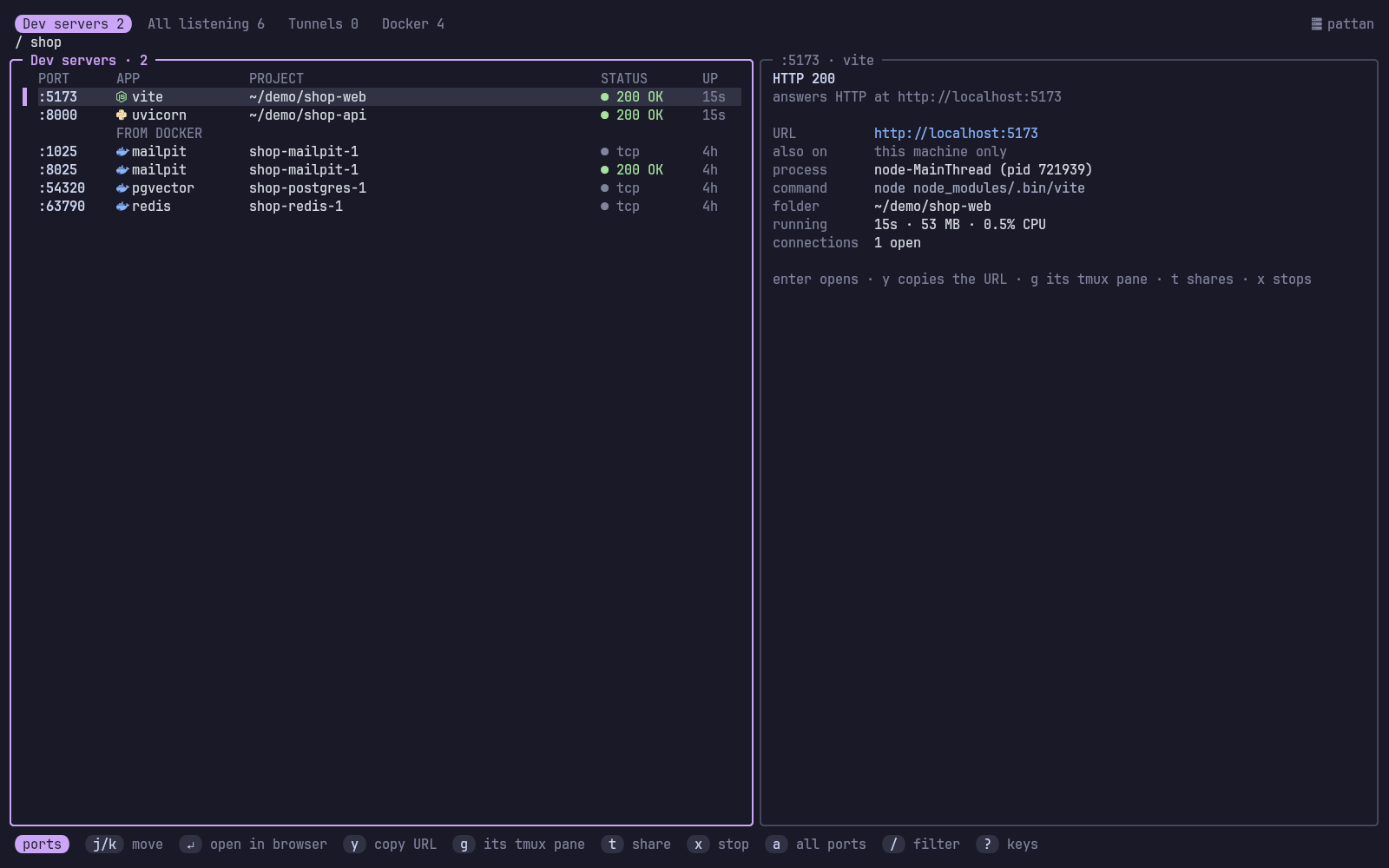
Screenshots use made-up demo projects.
#What it shows
- Dev servers: the TCP ports your own processes listen on from inside a project folder (somewhere under your home, not a hidden folder), so daemons like KDE Connect or mpd stay out. Each with the app (vite, next, nest, astro, django, uvicorn, rails, hugo... read from the command line, then from the project's
package.json), the project folder, whether it answers (HTTP status, ortcpfor databases, which are never sent HTTP), and how long it has run. Docker's published ports follow, under from docker. - The details pane: the page's
<title>, the URL, the address other machines on your network can use (when it listens on more than loopback), the process and its command, the folder, the tmux pane it runs in, uptime, memory, CPU, open connections, and its public tunnel URL if it has one. - All listening: every listening port on the machine, local or open to the network, with the process when it's yours to see.
- Tunnels: every tunnel running, with its public URL and the local server it points at:
- ngrok: from its local API (
localhost:4040): the public URL, the request count, and the last requests;Rsends one again (handy for webhooks),iopens ngrok's inspector. - cloudflared quick tunnels: the
trycloudflare.comURL, from its metrics server. - tailscale serve / funnel: what this machine serves, and whether it's public (funnel) or tailnet-only.
- ssh -R forwards: the remote host and port.
- localtunnel, bore, zrok: found by their process; the URL when their command line gives it.
- ngrok: from its local API (
- Docker: the ports containers publish.
t on a port starts a tunnel to it with any tool you have installed (ngrok, cloudflared, tailscale funnel, localtunnel, bore). It runs on its own, keeps running after pattan quits, and logs to ~/.local/state/pattan/<tool>-<port>.log.
Everything refreshes every 2 seconds; the HTTP check every 10.
#Keys
pattan uses the vim grammar every Vayu tool shares (vyakarana): in NORMAL, keys are commands and typing changes nothing; / starts INSERT to filter (Esc goes back and keeps the filter). Space is the leader: press it and a box lists what can follow (Space y copies, Space d stops, Space g goes to, Space t switches tabs...). Space Space searches every action, ? shows every key. Counts work (5j, 3gg). Anything that stops a server or a tunnel asks first, and only y says yes.
Keys that moved say where they went for one release: t → Space a t, T → Space g t, K (force stop) → Space d k, a → Space t a, on a tunnel R → Space i r and i → Space i i. g now starts g g; the tmux pane is Space g p. Tabs are H / L (Tab and h / l too); 1–4 are counts now, the tabs are Space t 1–4.
| Keys | What it does |
|---|---|
| j or Down | Move to the next port |
| k or Up | Move to the previous port |
| g g or Home | Jump to the first port (5gg: the fifth) |
| G or End | Jump to the last port (5G: the fifth) |
| Ctrl+d or PgDn | Scroll half a page down |
| Ctrl+u or PgUp | Scroll half a page up |
| L or Tab | Switch to the next tab |
| H or Shift+Tab | Switch to the previous tab |
| / or Space f f | Search the list by port, app, project or URL (filters it) |
| r or Space r | Rescan the ports now (it also rescans every 2 s) |
| ? or Space ? | Show every key of this view |
| q or Space q | Quit |
| Esc | Go back one step: clear the filter, then quit |
| Space Space | Search every action and run one (the palette) |
| Space t | Tabs… |
| Space t d or Space t 1 | Switch to Dev servers |
| Space t a or Space t 2 | Switch to All listening (every port) |
| Space t t or Space t 3 | Switch to Tunnels |
| Space t k or Space t 4 | Switch to Docker |
| While typing | |
| Esc | Stop typing and keep the filter (back to NORMAL) |
| Ctrl+j or Down or Ctrl+n | Move to the next port while typing |
| Ctrl+k or Up or Ctrl+p | Move to the previous port while typing |
On a port
| Keys | What it does |
|---|---|
| Enter | Open localhost:port in the browser |
| o or Space o b | Open localhost:port in the browser |
| y or Space y u | Copy the URL |
| Y or Space y l | Copy the URL other machines on your network can use |
| d d or x or Space d s | Stop the server (asks first; a container is stopped with docker stop) |
| Space a | Add… |
| Space a t | Start a tunnel to the port, to share it (ngrok, cloudflared, tailscale funnel...) |
| Space d | Delete… |
| Space d k | Kill the server at once (SIGKILL; asks first) |
| Space d t | Stop the port's tunnel (asks first) |
| Space g | Go to… |
| Space g p | Go to the tmux pane the server runs in |
| Space g t | Go to the port's tunnel in the Tunnels tab |
| Space y | Copy… |
| Space y p | Copy the public URL of the port's tunnel |
On a tunnel
| Keys | What it does |
|---|---|
| Enter or Space o b | Open the tunnel's public URL in the browser |
| o or Space o l | Open the local server the tunnel points at |
| y or Space y p | Copy the public URL |
| J | Move to the next of the tunnel's last requests (ngrok) |
| K | Move to the previous of the tunnel's last requests (ngrok) |
| d d or x or Space d t | Stop the tunnel (asks first) |
| Space i | Inspect… |
| Space i r | Send the selected request through the tunnel again (ngrok replay) |
| Space i i | Open ngrok's request inspector in the browser |
| Space y | Copy… |
| Space y u | Copy the local URL the tunnel points at |
#Install
Needs Linux with ss (iproute2). Docker, tmux and the tunnel tools are optional: pattan uses what's there.
curl -fsSL https://raw.githubusercontent.com/Theyashsawarkar/pattan/main/install.sh | bashdownloads the release binary (or builds it with Go) into ~/.local/share/pattan and links ~/.local/bin/pattan. Or make install (PREFIX, DESTDIR), or go install github.com/Theyashsawarkar/pattan/cmd/pattan@latest.
#As a tmux plugin
set -g @plugin 'Theyashsawarkar/pattan'prefix P opens pattan in a popup; P inside closes it. Without pattan on your PATH, the plugin builds it with Go the first time.
| Option | Default | |
|---|---|---|
@pattan-key | P | the key after the prefix; none binds nothing |
@pattan-width / @pattan-height | 90% / 88% | popup size |
@pattan-title | pattan | popup title |
@pattan-launcher | your own popup command instead of display-popup; it gets display-popup's arguments (-E -d DIR -T TITLE CMD) |
To open it from a status-line click, open a popup that runs ~/.tmux/plugins/pattan/scripts/pattan-run --client '#{client_name}'.
#Command line
pattan                 the screen
pattan list            the dev servers' ports: "5173 vite onads-super/apps/web"
pattan list --all      every listening port
pattan tunnels         the tunnels: "ngrok https://… -> :5173"
pattan --version#Colours
pattan follows varna's desktop theme (~/.local/state/varna/palette.json, a tools.pattan pick if the theme has one) and changes live with it; without varna it is Catppuccin Mocha. Icons need a Nerd Font; NO_NERD_FONT=1 turns them off.
#Privacy
pattan reads /proc and ss, asks your own ports over localhost, and talks to ngrok's and cloudflared's local APIs. Nothing leaves the machine unless you start a tunnel, which makes that one port public.
#License
MIT